Appearance
Asset Sale
The Asset Sale tab controls how an asset's sale workflow is set up when assets are sold on an order. To view it, head to the Platform Settings Page via links available on the Left Navigation Bar, click the Assets tab, and select Asset Sale.
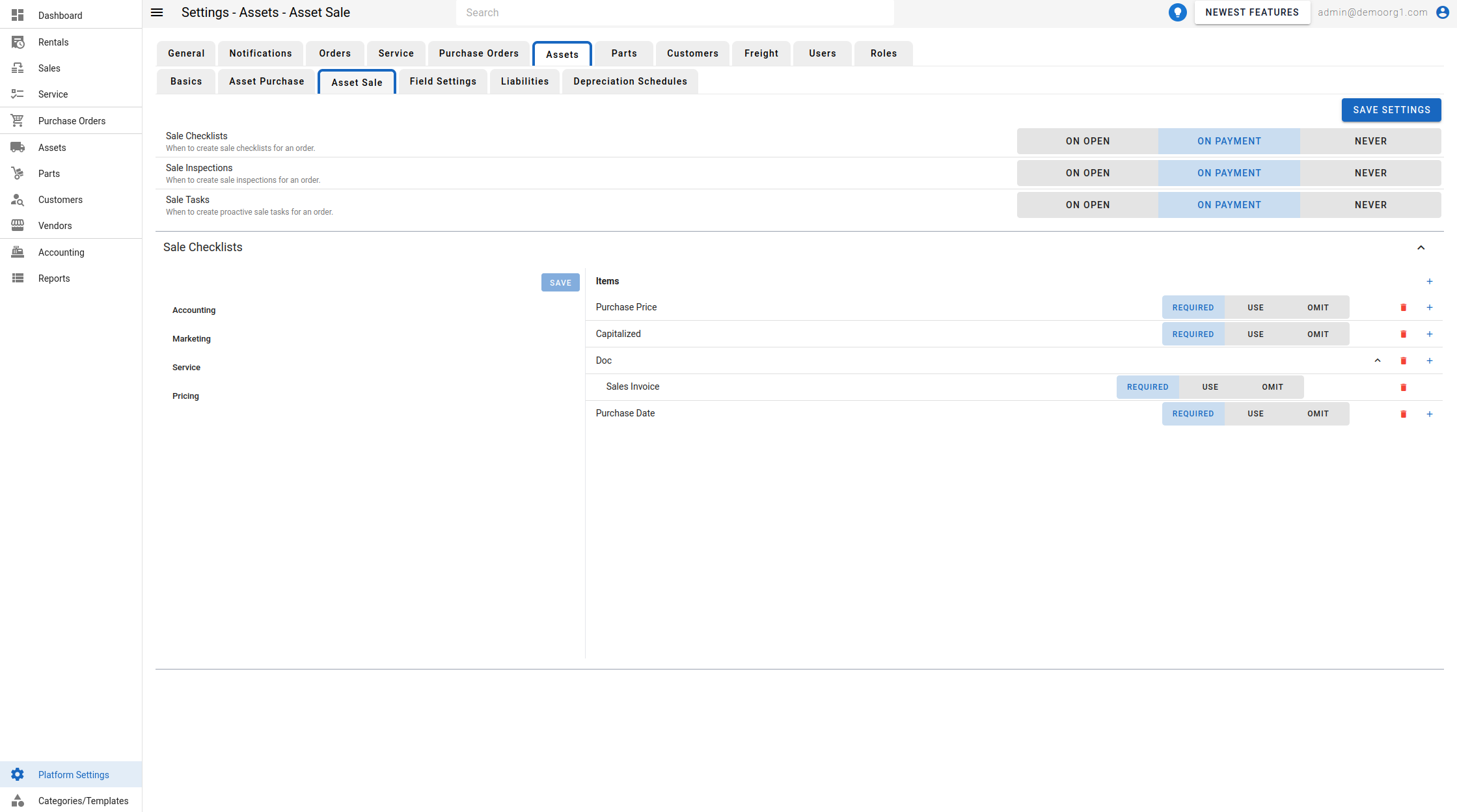
Sale creation settings
Each of the following settings controls when the related records are created for a sale order. Every setting offers the same three options:
- On Open — created when the sale order is opened.
- On Payment — created when the order is paid.
- Never — not created automatically.
- Sale Checklists — when to create sale checklists for an order.
- Sale Inspections — when to create sale inspections for an order.
- Sale Work Orders — when to create proactive sale work orders for an order.
To modify a setting, use its toggle and click Save Settings to sync with the server.
Off-boarding Checklists
Below the settings, the Off-boarding Checklists section (previously labelled Sale Checklists) manages the checklist templates used when a sale/off-boarding checklist is created (per the setting above). As with other asset checklists, checklists themselves cannot be created or deleted — only their items are managed: use the + button to add an item (or a nested item on an item's row — nesting is one level deep), set each item's Input Type and optional Data Association (see Checklists), toggle its field option, and click Save.