Appearance
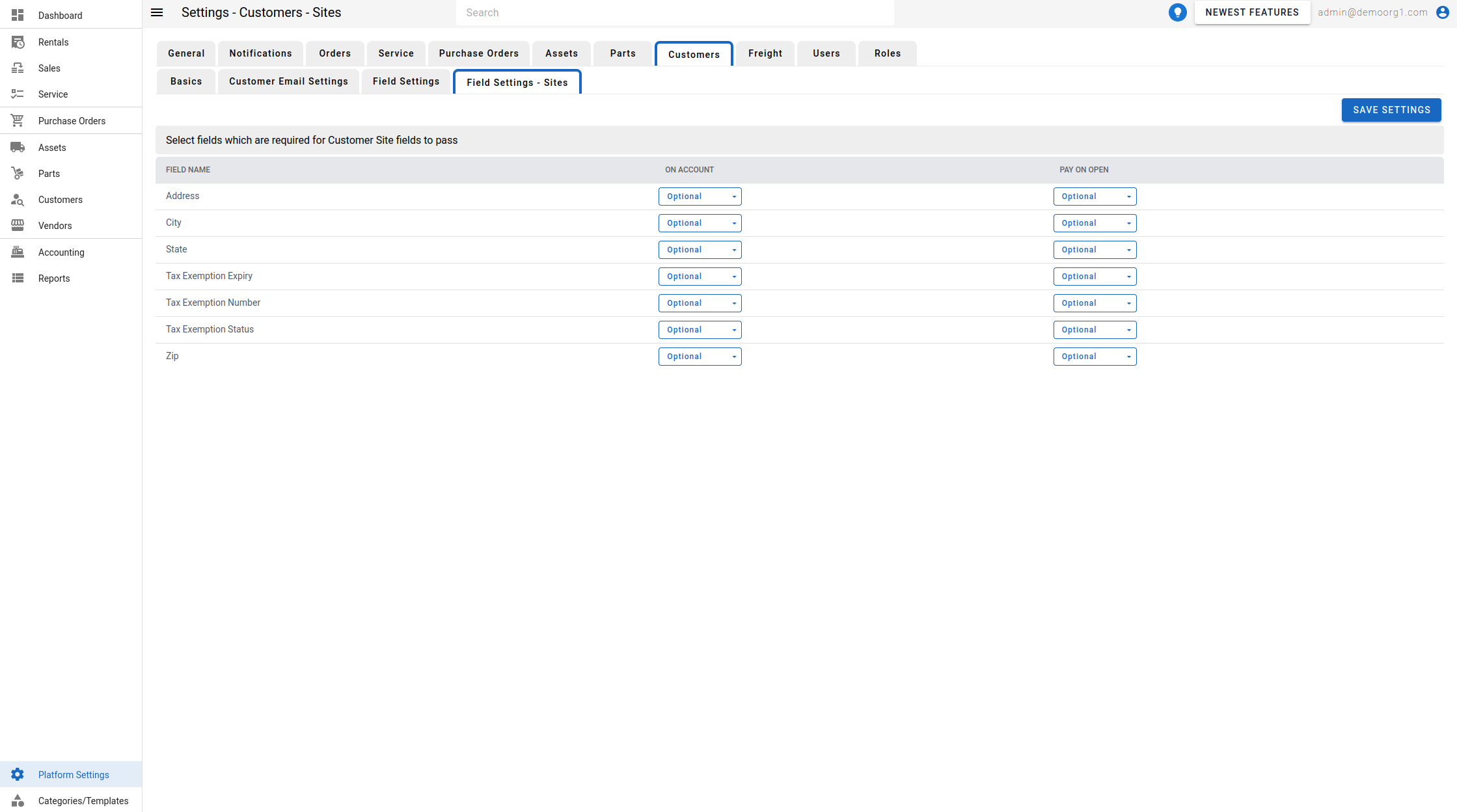
Site Field Settings
The Site Field Settings govern the degree of importance each customer Site field has when a site is created and validated — the same model used for customer, asset, and part fields. Any site field can have one of four settings:
- Require: Fields with the
requiresetting cannot be left empty. They must be provided when adding a site. - Validate: Fields with the
validatesetting are essential for business processes. A site (and its customer) can be saved with these missing, but will be rendered invalid until valid data is provided. - Optional: Fields with the
optionalsetting can be ignored, with no restriction. - Omit: Fields with the
omitsetting are ignored by the software and are not displayed on the Site form.
Like customer fields, site fields have separate settings per customer type — Default, On Account, and Pay On Open — so a field can be required for one customer type but not another. The governed site fields are Address, City, State, Zip Code, and Tax Exemption Number (the Site name and Description are always shown). Field settings do not apply to facilities.
Each setting is shown as a colored chip so you can spot a field's requirement level at a glance:
| Setting | Color |
|---|---|
| Require | Red |
| Validate | Dark yellow |
| Optional | Blue |
| Omit | Grey |
To open this screen, head to Platform Settings via the Left Navigation Bar, open Customers, and select the Field Settings - Sites tab. To modify a setting, edit the field and click Save Settings to sync with the server.